
The platform for O & A Level tuition centres
From lesson.To marked script.To parent's phone.
Digital Academy runs your centre's teaching in one place: lessons your teachers unlock, homework handed in from a phone, marking with an AI assistant, and parents who always know how their child is doing.
- 1123 O Level English Language
- 2010 O Level Literature in English
- 2210 O Level Computer Science
- 4024 O Level Mathematics
- 4037 O Level Additional Mathematics
- 5054 O Level Physics
- 5070 O Level Chemistry
- 5090 O Level Biology
- 8021 AS Level English General Paper
- 8695 AS Level Language and Literature in English
- 9093 AS & A Level English Language
- 9618 AS & A Level Computer Science
- 9695 AS & A Level Literature in English
- 9700 AS & A Level Biology
- 9701 AS & A Level Chemistry
- 9702 A Level Physics
- 9709 A Level Mathematics
- 9990 AS & A Level Psychology
- 0500 IGCSE First Language English
- 0990 IGCSE First Language English (9–1)
- 0510 IGCSE English as a Second Language
- 0511 IGCSE English as a Second Language (count-in speaking)
- 0475 IGCSE Literature in English
- 0993 IGCSE English as a Second Language (9–1)
- 0610 IGCSE Biology
- 0620 IGCSE Chemistry
- 0478 IGCSE Computer Science
- 0580 IGCSE Mathematics
- 0625 IGCSE Physics
01 / What you get
Everything your centre runs on.In one calm place.
One platform for the people who run the centre, the teachers in front of the class, the students doing the work and the parents paying for it.
- 01
A Study Guide your teachers unlock
Every lesson follows the syllabus, with interactive labs and question flashcards. Teachers open lessons as they teach them, so students never run ahead or get lost.
Lessons · Labs · Flashcards - 02
Homework without the WhatsApp chaos
Set work for a class or chosen students, attach worksheets, pick a due date in one click. Students view the file, photograph their answers and hand in.
Assignments · Files · Due dates - 03
Marking with an assistant, not a replacement
Handwritten pages are read from the photo. The AI can draft marks and feedback; your teacher checks, adjusts and returns. Nothing reaches a student until they do.
Handwriting reading · Teacher decides - 04
Past papers and timed mocks
Thousands of past papers ready to set. Mocks unlock when a student has finished their lessons, answered on the paper under exam conditions.
Mocks · Practice papers · Grades - 05
Parents kept in the loop
Marks, attendance, missing homework and meetings, on the parent's phone. No app to install, no group chats to manage.
Parent view · Notices · Meetings - 06
Your whole centre at a glance
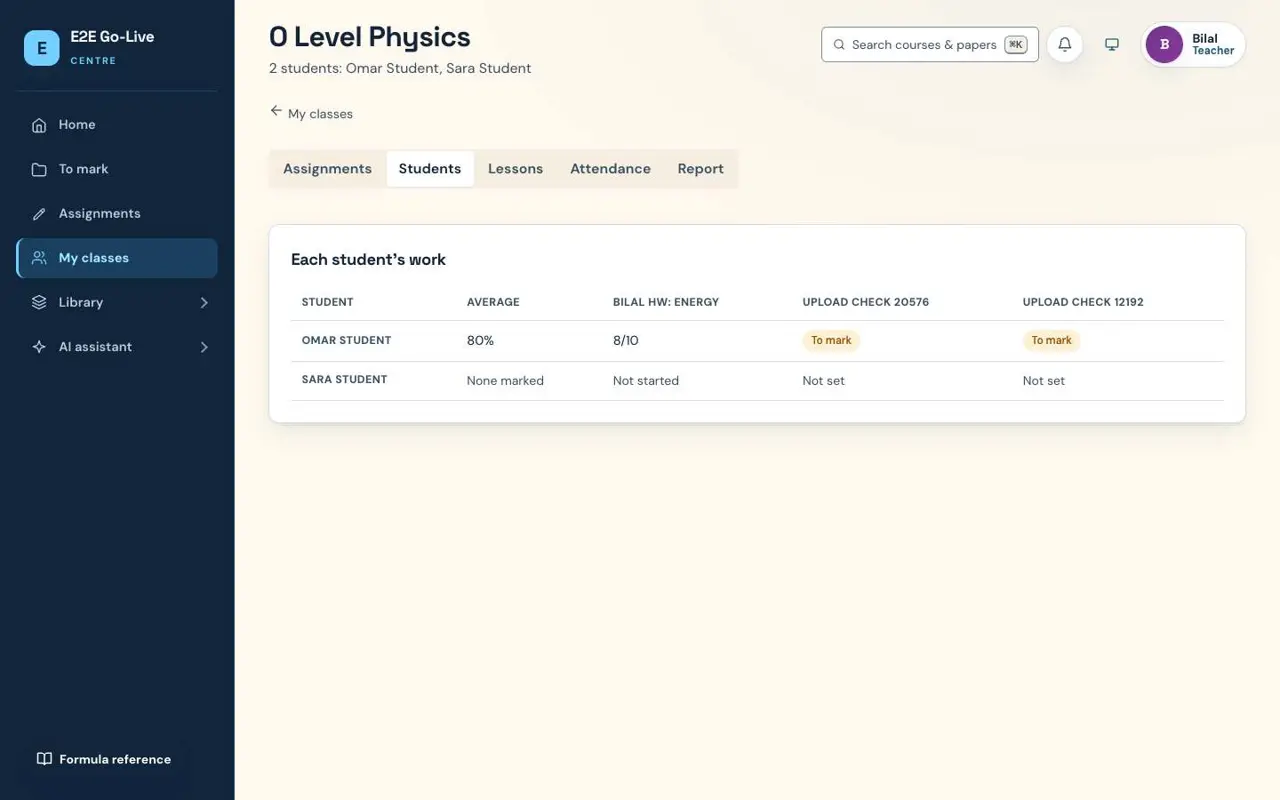
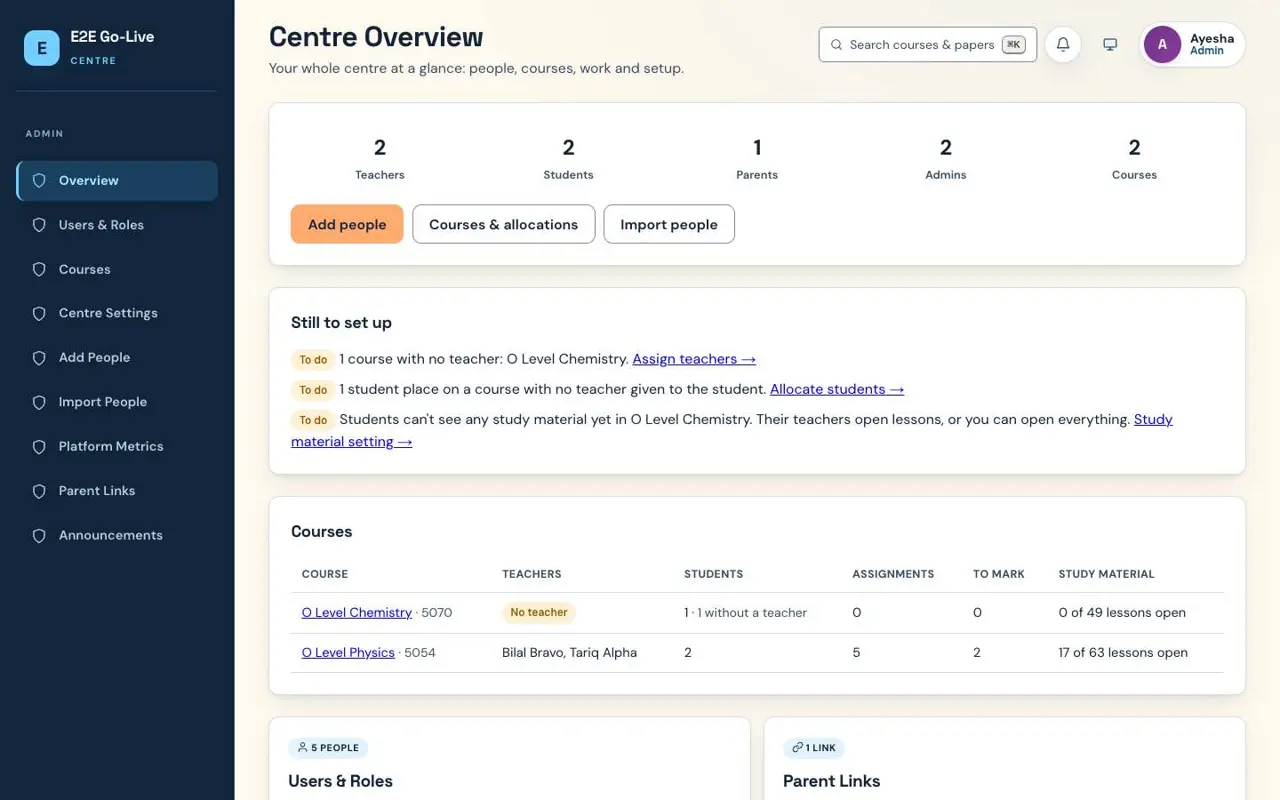
Every course, teacher and student in one overview, with what's still to set up. Each teacher sees how each student is doing, class by class.
Overview · Class reports · Allocations
29
Cambridge syllabuses
O Level, IGCSE, AS & A Level
891
Syllabus-aligned lessons
with labs and worked examples
3,249
Past papers
for timed mocks and homework
131
Topic practice papers
marked by your teachers
02 / How it works
Four people. One connected week.Everyone sees what they need.
Each person signs in to their own space. Pick a role to see their side, taken from the real app.
Set up your centre in an afternoon.
- Add teachers, students and parents, one by one or from a spreadsheet.
- Create courses and choose which teacher teaches which student.
- See every course, its teachers, work to mark and what's still to set up.
03 / Marking
Snap. Read. Mark. Return.The teacher stays in charge.
- Snap Students photograph their handwritten pages and hand in from their phone.
- Read The handwriting is read and checked twice; anything uncertain is flagged for the teacher.
- Mark Marks and feedback beside the script, with ready-made comments and an optional AI draft.
- Return The student and their parent see the mark the moment the teacher sends it.
04 / Subjects
29 syllabuses, ready on day one.Lessons and past papers included.
Every syllabus comes with lessons written to its content, flashcards and past papers. Your teachers can add their own notes and worksheets on top.
O Level 8
- 1123English Language
- 2010Literature in English
- 2210Computer Science
- 4024Mathematics
- 4037Additional Mathematics
- 5054Physics
- 5070Chemistry
- 5090Biology
IGCSE 11
- 0500First Language English
- 0990First Language English (9–1)
- 0510English as a Second Language
- 0511English as a Second Language (count-in speaking)
- 0475Literature in English
- 0993English as a Second Language (9–1)
- 0610Biology
- 0620Chemistry
- 0478Computer Science
- 0580Mathematics
- 0625Physics
AS & A Level 10
- 8021English General Paper
- 8695Language and Literature in English
- 9093English Language
- 9618Computer Science
- 9695Literature in English
- 9700Biology
- 9701Chemistry
- 9702Physics
- 9709Mathematics
- 9990Psychology
05 / Questions
Good questions.Straight answers.
Is each centre's data kept separate?
Yes. Every centre is sealed off from every other one at the database level, so no centre can ever see another's students, work or marks. Within a centre, teachers see only the students they teach.
Does the AI mark work on its own?
No. It reads handwriting from the photo and, when a teacher asks, drafts marks and feedback. The teacher checks and changes anything before returning it. Students only ever see what the teacher sends.
Which subjects and boards are covered?
Cambridge O Level, IGCSE and AS & A Level: 29 syllabuses across the sciences, mathematics, computer science, English and psychology, each with lessons and past papers.
Do students and parents need to install anything?
No. Digital Academy runs in any modern browser, on a phone, tablet or computer. Everyone signs in with the account their centre gives them.
Can we use our own name and logo?
Yes. Your centre's name and logo appear across the app for your teachers, students and parents.
How do we get started?
Book a demo below. We'll walk you through it, set up a 30-day pilot for your centre and help you bring your first classes on.
The next term starts here
Let's bring your centreonline this term.
Tell us about your centre. We'll show you Digital Academy with your own subjects, then set up a 30-day pilot for your teachers and students.
- A 30-minute walkthrough, online or at your centre
- Your centre's name and logo, your own subjects
- Help importing your teachers, students and parents